A shared Gmail login is how most Shopify stores start doing support, and for a while it works fine. Two people, one password, a few emails a day. You both know what came in and who replied.
Then the store grows a little. A customer gets two different answers ten minutes apart. Another gets none, because each of you assumed the other had it. Someone marks an email as read on their phone and it quietly disappears from everyone's to-do list.
None of that means your team is doing anything wrong. It means you are using a personal email tool for a team job. A unified inbox is the tool built for that job, and most small teams don't realize how much it does until they see one.
What a unified inbox actually is
A unified inbox pulls every customer conversation into one shared workspace and turns each one into a ticket. A ticket is just a conversation with three extra things attached: an owner, a status, and a history.
That sounds small. In practice it changes the question your team asks all day. In a shared mailbox the question is “did anyone answer this?” In a unified inbox the answer is already on the screen.
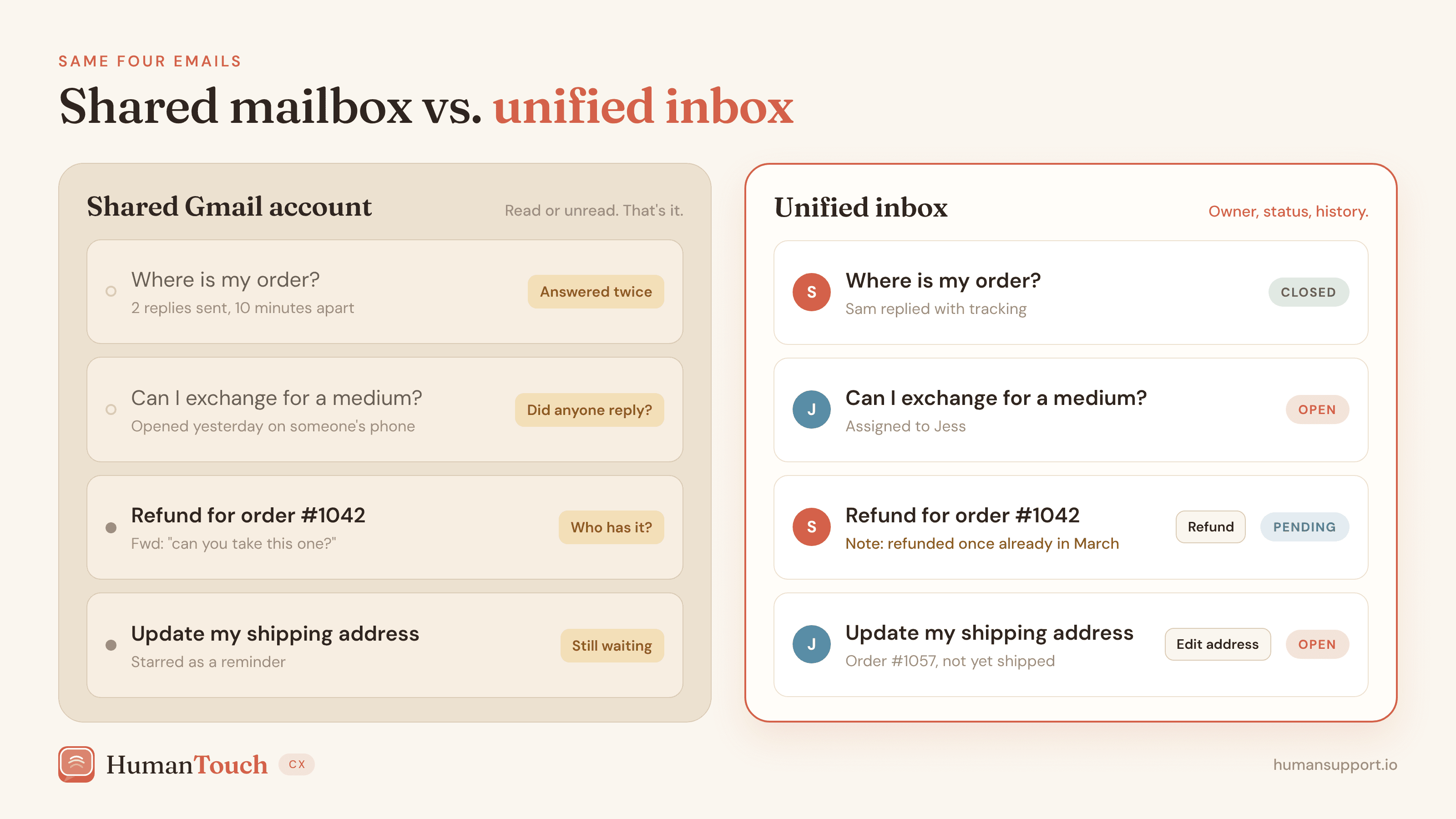
Five things you get that a shared mailbox can't give you
1. Every conversation has an owner
Assign a ticket to yourself or a teammate and everyone can see who has it. No more replying over each other, and no more messages that sit for two days because they looked handled. If you are out tomorrow, you reassign your open tickets in a couple of clicks instead of forwarding emails with “can you take this one?”
2. Internal notes stay next to the conversation
In Gmail, talking about a customer means forwarding the thread, texting your teammate, or starting a draft and hoping nobody hits send. Internal notes live inside the ticket, visible only to your team. “Refunded this once already in March.” “Waiting on the warehouse, check back Thursday.” Whoever picks the ticket up next has the full story without asking.
3. Quick actions without switching tabs
Most support emails end in an action: look up an order, check tracking, issue a refund, update an address. With a shared mailbox, that means copying an order number, opening Shopify admin, searching, doing the thing, then coming back to write the reply. A unified inbox built for Shopify puts those actions beside the conversation, so the answer and the fix happen in the same place.
4. The customer's history is already there
When a ticket opens, you see who the customer is, what they ordered, and what they have written in about before. You stop asking people for their order number. You also stop treating a loyal repeat buyer like a stranger.
5. You can see what is open at a glance
Open, pending, closed. Mine, yours, unassigned. A shared mailbox gives you read and unread, and that state changes the moment anyone opens the email. Real statuses mean you can end the day knowing exactly what is still waiting on you.
| What you need | Shared Gmail account | Unified inbox |
|---|---|---|
| Who is handling it | Guess, or ask | Assigned owner on every ticket |
| Team discussion | Forwards, texts, side chats | Internal notes inside the ticket |
| Order lookups and refunds | Separate tab, copy and paste | Quick actions beside the conversation |
| Customer history | Search the mailbox | Shown automatically |
| What is still open | Read vs. unread | Clear statuses and views |
“We're only two people. Do we really need this?”
Two people is exactly where it starts to matter. One person never collides with themselves. The second person is when “I thought you had it” becomes possible.
You have probably outgrown the shared mailbox if any of these sound familiar:
- A customer has received two replies to the same email, or none.
- You use stars, labels, or “mark as unread” as a to-do system.
- You text each other about customer emails.
- You keep Shopify admin open in another tab all day just to look up orders.
- Taking a day off means writing a handover message first.
If none of those apply yet, a shared mailbox may still be enough. If two or more do, the time you are losing each week is likely more than a unified inbox costs.
What to look for in a unified inbox
There are a lot of tools in this category, and most of them cover the basics above. The differences show up in the details. Whichever tool you end up choosing, these are the questions worth asking before you commit.
Does it cover the channels your customers actually use?
List where your conversations come from today: email, live chat, Instagram, Facebook, SMS, contact forms. Check that each one is supported, and whether it is included in your plan or sold as an add-on. Paying for ten channels when you use two is as much of a mismatch as missing one you rely on.
How deep is the integration with your store?
“Integrates with Shopify” can mean anything from showing an order number to letting you refund, cancel, and edit orders from the ticket. Ask to see exactly what you can view and what you can do without leaving the inbox. This is where most of the daily time savings come from.
How is it priced, and what happens when you grow?
Tools charge per seat, per ticket, per resolution, or some mix of the three. None of these is wrong, but they scale very differently. Estimate your cost at today's volume, then again at double the volume with one more teammate. Pay attention to what happens during your busiest month of the year.
How long does setup take?
A small team should be answering real tickets on day one, not after a multi-week onboarding project. Ask how your existing support address connects, whether past conversations can be imported, and whether you can set it up yourself.
Are the collaboration basics solid?
Assignment, internal notes, statuses, and collision detection (a warning when a teammate is already replying) should all be included and easy to use. Test them with a teammate during the trial. These features are simple, but you will use them hundreds of times a week.
What can you automate, and how much control do you keep?
Saved replies, auto-tagging, and routing rules save real time. Many tools now add AI that drafts or sends replies. Find out what the AI is allowed to do on its own, whether you can review messages before they go out, and how it is billed. Decide how much autonomy you are comfortable with before the sales call, not during it.
Can you see how you are doing?
You do not need a wall of dashboards. You do need first response time, resolution time, and ticket volume by topic. Those three numbers tell you whether customers are waiting too long and what keeps going wrong upstream.
Can you leave if it is not working?
Check the contract length, whether you can export your conversation history, and how responsive the vendor's own support is. A company that sells support software and is slow to answer your questions is telling you something.
A free plan or trial is the best test of all. Run a real week of tickets through the tool before deciding. You will learn more from that than from any feature comparison page.
Try it without changing how you work
Switching does not mean a new support address or a big migration. Your customers keep emailing the same place. Your team just gets a better view of it.
HumanTouch is a unified inbox built for Shopify stores, with assignments, internal notes, and order context in one place. The free Human to Human plan includes one seat and 50 conversations, so you can see the difference on your own tickets before you commit to anything.
Install HumanTouch from the Shopify App Store or book a 15-minute demo and we will walk through it with your actual inbox.